Stop Letting Live Voicemail Go Ignored: The Hidden ‘Screen Your Calls Like Email’ Trick iPhone Power Users Use To Never Miss What Matters
You know the routine. Your phone rings while you are in a meeting, on a train, walking into the doctor’s office, or just not ready to talk. So you let it go to voicemail. Later, you sit down with a list of missed calls, half-baked voice messages, and that nagging feeling that one of those unknown numbers might have been a client, a school nurse, or a delivery driver with something expensive in hand. It is frustrating because the old choice used to be all or nothing. Answer now, or deal with the mystery later. Live Voicemail on iPhone changes that. If you set it up right, you can watch a voicemail get transcribed in real time while the caller is leaving it, then decide whether to pick up. Think of it like screening calls the same way you scan your email inbox. Fast, quiet, and much smarter than just ignoring every unknown number.
⚡ In a Hurry? Key Takeaways
- Live Voicemail lets you read a caller’s message as they leave it, so you can decide in the moment whether to answer.
- Go to Settings > Phone > Live Voicemail, turn it on, then use Focus, contacts, and silence settings to build a smarter call-screening setup.
- It is one of the safest ways to cut down on spam without missing work calls, family emergencies, or time-sensitive deliveries.
How to use Live Voicemail on iPhone to screen calls
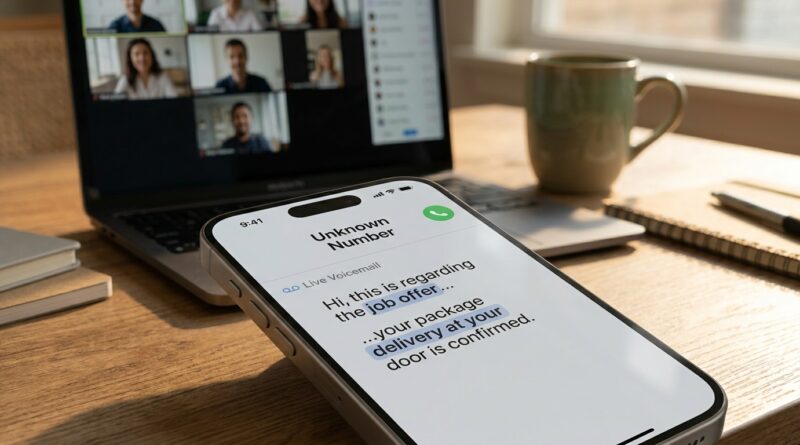
The basic idea is simple. When a call you do not answer rolls to voicemail, your iPhone can show a live transcription of what the caller is saying. While they are talking, you can decide whether it is worth picking up.
That means you do not have to guess anymore. Unknown number? Fine. Let it start talking. If it is a robocall, you keep ignoring it. If it is your kid’s school, a recruiter, a customer, or your mechanic saying your car is ready, you can jump in right then.
This is why power users love it. It turns the Phone app into a triage tool instead of a constant interruption machine.
How to turn on Live Voicemail
On most current iPhones running a recent version of iOS, setup takes less than a minute.
Step-by-step
Open Settings. Tap Phone. Tap Live Voicemail. Turn Live Voicemail on.
That is the switch most guides stop at. It is enough to enable the feature, but not enough to make it truly useful in real life.
What you should expect once it is on
When someone leaves a voicemail, you will see their words appear on screen as they speak. If you decide the call matters, you can answer while they are still leaving the message.
If you do nothing, the voicemail saves normally and you can review it later.
The real trick is not the toggle, it is the setup around it
If you want to screen calls like email, you need a system. The best setup is usually a mix of Live Voicemail, contact management, Focus modes, and spam filtering.
1. Make your contacts list do more work
If somebody matters, they should be in your contacts. That sounds obvious, but many people still rely on memory and recent calls instead.
Add key clients, family members, schools, doctors, contractors, regular delivery services, and your workplace numbers. The more complete your contacts are, the easier it is to treat unknown numbers with healthy suspicion.
2. Use Silence Unknown Callers carefully
Apple also gives you Silence Unknown Callers under Settings > Phone. This can be great if spam is out of control, but do not switch it on blindly if you depend on first-time callers for work.
A better approach for many people is this: leave unknown callers able to ring, but rely on Live Voicemail to decide whether they deserve your attention.
If your spam problem is especially bad, turn on Silence Unknown Callers during specific hours and turn it off when you are expecting business or family-related calls.
3. Pair it with Focus modes
This is where the setup gets really smart. During work hours, a custom Focus mode can allow calls from favorites or repeated callers, while everything else quietly rolls toward voicemail. Then Live Voicemail becomes your side door. You are not disturbed unless the message proves it is worth it.
During personal time, you can tighten things further. During freelance hours, you can loosen them up.
When Live Voicemail is better than just rejecting a call
Rejecting a call sends a clear “not now” signal. Letting it go to Live Voicemail is softer and often more useful.
Here is where it shines:
- When you are in meetings but still need to catch urgent work calls
- When you are driving or in transit and cannot answer every ring
- When you are expecting a one-time call from a contractor, recruiter, clinic, or school
- When an unknown number could be spam, but could also be important
- When you want less interruption without looking hard to reach
That last one matters more than people admit. Live Voicemail helps you look responsive without forcing you to be instantly available to everyone.
How to tell if a missed call problem is really voicemail, or something else
Sometimes people think Live Voicemail is failing when the real issue is their carrier connection, call forwarding, or weak signal. If calls are going straight to voicemail too often, even from known contacts, it is worth checking the basics.
We covered that in Stop Treating Your Dialer Like a Toy: The Hidden iPhone ‘Secret Codes’ Power Users Turn Into a Live Network Dashboard. It is a handy companion if your problem is not just screening calls, but figuring out why calls are acting weird in the first place.
How I would set this up for three common types of users
The freelancer or small business owner
Keep Live Voicemail on. Do not silence unknown callers full time. Use Focus during deep-work blocks so calls can roll to voicemail without blowing up your concentration. Watch live transcriptions for keywords like “quote,” “project,” “delivery,” or “call me back today.”
The parent or caregiver
Save all school, daycare, doctor, family, and neighbor numbers to contacts. Allow those through in Focus settings. Use Live Voicemail for everything else. This cuts down panic around unknown calls while still giving you a way to catch something urgent.
The spam-weary power user
Turn on Live Voicemail. Test Silence Unknown Callers during high-spam periods. Let the Phone app become a filter instead of your attention getting hijacked every hour. This is especially useful if scam calls have trained you to ignore everything.
What Live Voicemail does not do
It is good, but it is not magic.
- It will not stop all spam calls from reaching you
- Transcriptions may not be perfect, especially with accents, noise, or bad connections
- Some callers hang up before leaving enough detail to help you decide
- Carrier and region support can affect voicemail behavior
Still, even an imperfect live transcript is usually far better than staring at an unknown number and guessing.
Small habits that make it much more useful
Listen for patterns in the transcript
You do not need every word. You just need enough context. “This is Sarah from the pediatric office,” tells you everything. So does “I am calling about your interview” or “We are outside with your appliance delivery.”
Update contacts after important calls
If an unknown number turns out to matter, save it. The best Live Voicemail setup gets better over time because fewer important people stay “unknown.”
Use voicemail greetings strategically
A clear greeting helps real callers leave useful information fast. Keep it short and calm. Something like: “Hi, I cannot take your call right now. Please leave your name, number, and a brief reason for calling.”
That little prompt often improves the transcript and makes screening easier.
At a Glance: Comparison
| Feature/Aspect | Details | Verdict |
|---|---|---|
| Live Voicemail | Shows a real-time transcript while the caller leaves a message, giving you a chance to answer mid-message. | Best overall option for screening without fully disconnecting. |
| Silence Unknown Callers | Sends unfamiliar numbers away from your attention, but can also hide legitimate first-time calls. | Useful for heavy spam, but use with care if your work depends on new callers. |
| Focus + Contacts Setup | Lets trusted people ring through while everyone else gets filtered more quietly. | The smartest long-term setup for power users. |
Conclusion
Spam and unknown calls are getting worse, and most of us are relying on our iPhones for work, side gigs, deliveries, appointments, and family updates. That is why Live Voicemail matters more than it first appears. It gives you a middle ground. You do not have to answer every ring, and you do not have to treat every unknown number like a dead end. Once you switch it on and tune the rest of your call settings around it, your iPhone starts acting less like a noisy phone and more like a quiet call dashboard. That is the real win. You stay reachable to the people who matter, while putting a little more distance between yourself and the constant flood of junk calls. For a feature that is already built in, it is wildly underused, and one of the most practical iPhone tricks you can start using today.