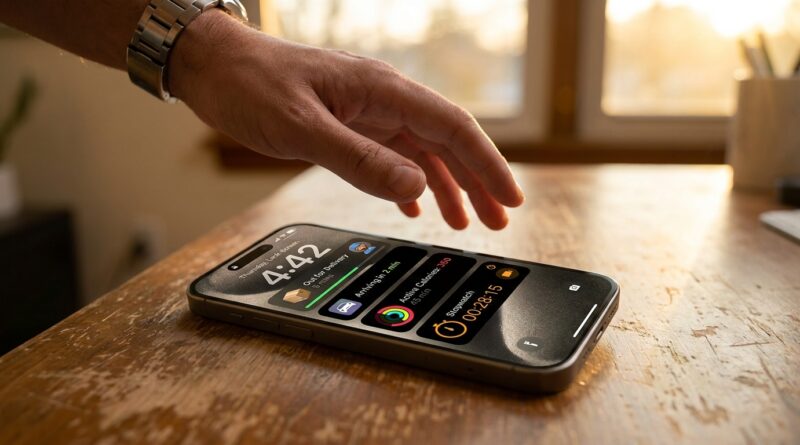
Stop Letting Your Lock Screen Be Useless: The Hidden ‘Live Activity Dashboard’ Trick Power Users Use To Run Their Day Without Unlocking
You know the drill. You pick up your iPhone to check if the food is close, whether the Uber is two minutes away, how long is left on the laundry timer, or if the game is still tied. Then one quick glance turns into a full unlock, a few notifications, maybe a text reply, and suddenly your focus is gone. It happens dozens of times a day, and it adds up.
The fix is hiding in plain sight. Live Activities are not just those occasional little cards for music or delivery apps. If you set them up on purpose, your Lock Screen becomes a mini dashboard that shows the stuff you actually care about right now. Deliveries, flights, workouts, ride shares, timers, sports scores, and more can sit there waiting for a glance. No full unlock. No app hopping. Once you start using the iPhone Live Activities hidden features this way, your phone feels less like a distraction machine and more like a useful assistant.
⚡ In a Hurry? Key Takeaways
- Live Activities can turn your Lock Screen and Dynamic Island into a real-time dashboard for deliveries, rides, timers, workouts, flights, and scores.
- Go to Settings, Face ID & Passcode, and app notification settings to make sure Live Activities are allowed, then choose apps that update useful info without needing an unlock.
- This saves time and cuts distraction, but the best results depend on which apps support Live Activities well.
What Live Activities actually are
Think of Live Activities as glanceable status cards for things that are happening right now.
Not general notifications. Not widgets. Not a pile of banners. They are meant for active, time-sensitive stuff.
On iPhone, they can appear on the Lock Screen. If you have a model with Dynamic Island, they can also sit at the top of the screen in a compact form.
That means you can check progress without fully opening the app. For a lot of people, that is the hidden trick. The feature is not new, but using it on purpose is.
Why this matters more than people think
Most phone distractions start with a harmless check.
You unlock your phone for one reason. Then your brain gets pulled into three others. A message bubble, a news alert, a social app badge. There goes the next five minutes.
Using Live Activities as a dashboard cuts out that extra step. You get the answer you wanted right on the Lock Screen, and you can put the phone back down.
It sounds small. It is not small.
If you are already trying to make your iPhone less annoying, this pairs nicely with Stop Letting Background Apps Eat Your Battery: The Hidden ‘Smart Background Freeze’ Trick iPhone Power Users Use To Kill Overnight Drain. One tip reduces wasted battery. This one reduces wasted attention.
How to turn your Lock Screen into a Live Activity dashboard
1. Make sure Live Activities are allowed
Start with the boring but important part.
Go to Settings > Face ID & Passcode. Enter your passcode, then scroll down and make sure Live Activities is turned on.
Then check app permissions too. Go to Settings > Notifications, pick an app that supports Live Activities, and make sure notifications and Live Activities are allowed if that option appears.
2. Pick your “glanceable” apps
This works best when you choose apps that answer real daily questions.
Good examples include:
- Food delivery apps
- Ride share apps
- Airline and flight tracking apps
- Sports score apps
- Workout and running apps
- Timer, countdown, and cooking apps
- Navigation and transit apps
The goal is simple. Add apps that save you from unlocking your phone just to ask, “How much longer?”
3. Start activities on purpose
This is the part many people miss.
Live Activities usually appear only when something is actively happening. You have to start the ride, begin the workout, order the food, set the timer, or track the flight.
Once that happens, the app can place a live card on your Lock Screen. Some apps do this automatically. Others ask permission once and then keep doing it in the background.
4. Use Dynamic Island as your quick peek spot
If your iPhone has Dynamic Island, this gets even better.
You can see a tiny live status at the top without even going to the Lock Screen. A long press often expands it into more detail. A tap usually jumps into the app.
That makes it perfect for things like:
- Remaining timer time
- Current sports score
- Ride arrival progress
- Turn-by-turn navigation status
- Workout pace or duration
The best real-world uses for busy people
Deliveries
This is the gateway use case. You order lunch, groceries, or a package, and the progress sits right there. You do not need to keep reopening the app like a raccoon checking the fridge.
Timers and cooking
If you cook, do laundry, work in sprints, or manage school pickups, this is one of the most practical iPhone Live Activities hidden features. Your countdown stays visible, which means fewer “Wait, how much time is left?” checks.
Ride shares and transit
Watching your driver approach from the Lock Screen is much nicer than opening the app every 90 seconds. Same goes for train timing or bus tracking in supported apps.
Flights
Flight apps are getting better at showing gate changes, boarding windows, delays, and countdowns as Live Activities. For travel days, that is exactly the kind of info you want fast.
Workouts
Many fitness apps can show elapsed time, pace, distance, or heart-rate-related progress. Handy if you want a quick look while moving without diving into the whole app.
Sports scores
If you follow one game closely, Live Activities are much better than getting hit with a dozen separate alerts. You get a single running status instead of a flood.
How power users make this feel intentional
The trick is not installing more apps. It is choosing fewer, better ones.
Think of your Lock Screen like a tiny mission control panel. It should show active things that matter right now, not random clutter.
A simple setup might look like this:
- Morning: calendar countdown, commute or transit updates, coffee order status
- Workday: timers, delivery tracking, ride share pickup, focus-related tools
- Evening: workout stats, dinner timer, sports score, family pickup timing
That is when the feature stops feeling cute and starts feeling useful.
A few limits to know before you get excited
Not every app supports Live Activities. Some do a great job. Some barely use the feature. Some still treat it like an afterthought.
Also, Apple controls how long and how prominently activities stay visible. You do not get endless customization like you would on a full home screen widget setup.
And if privacy matters, remember that some info may be visible on your Lock Screen. If you do not want ride details, deliveries, or sports updates showing when your phone is on the table, adjust notification previews and app settings.
Quick fixes if Live Activities are not showing up
Check system settings
Make sure Live Activities are enabled under Face ID & Passcode.
Check app settings
Some apps have their own switch for live updates inside the app itself.
Update your apps
Support has improved a lot over recent iOS versions, and many newer app updates add better hooks.
Start a supported action
You usually need an active task, like a timer or delivery, before the Live Activity appears.
Restart if something seems stuck
Classic advice, yes. Still works more often than people want to admit.
At a Glance: Comparison
| Feature/Aspect | Details | Verdict |
|---|---|---|
| Lock Screen Live Activities | Shows real-time info for active tasks like deliveries, timers, flights, and workouts without opening the app. | Best for quick checks and fewer distractions. |
| Dynamic Island support | Offers a compact top-of-screen view and expandable controls on supported iPhones. | Excellent for fast peeks while using other apps. |
| App support quality | Some apps are fantastic, others are limited or do not support the feature at all. | Useful, but only as good as the apps you choose. |
Conclusion
Your Lock Screen does not have to be a fancy wallpaper with a clock on top. It can be the fastest, least distracting place to check the things that matter right now. That is the real win with iPhone Live Activities hidden features. Over the last few iOS versions, they quietly turned into something much more useful than a music card or the occasional food delivery update. If you set them up with intent, your iPhone can track deliveries, workouts, flights, ride shares, timers, focus-related tasks, and more without dragging you into a full unlock every time. Big tech sites still often treat this like a novelty. It is not. For busy people, it is one of those rare phone tricks that genuinely saves time, protects focus, and makes you wonder why you did not start using it sooner.